


SmartWatch Connect for Android
3.981.00 Reviews
App Specs
- Version
- 23.0
- Updated On
- License
- Free
- Downloads
- 100,000+
- Developer
- JedyApps
- Categories
- Libraries & Demo
- Platform
- Android
Screenshots
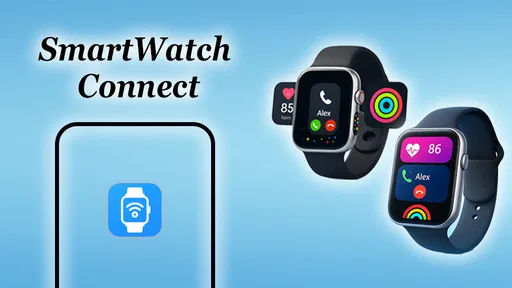
 Analysis by AppCompare
I judge a smartwatch companion by one practical test: after setup, does it help me leave my phone alone without making the watch feel like another source of noise? That is the promise behind SmartWatch Connect, an Android app from Shadow soft in the Libraries & Demo category. Its central job is to link a phone and smartwatch over Bluetooth so notifications can reach the wrist. That focused role is useful, but it also means the experience depends on the watch, the phone, and the notification habits you bring to it.
Getting Started with SmartWatch Connect
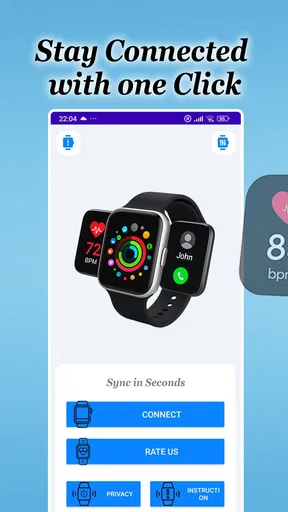
First things first, downloading and installing SmartWatch Connect on your Android device is a breeze. Just pop into the Play Store, hit download, and you’re good to go. The app walks you through the setup process, syncing seamlessly with your device in just a few taps. It's like pairing a fine wine with dinner – effortless and oh-so-satisfying.
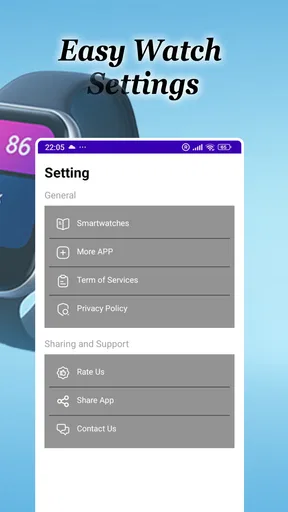
Once installed, you open up a world of possibilities. The app’s interface is straightforward, with a clean design that doesn’t overwhelm you with too many options all at once. You’ll find a simple menu where you can customize your settings, choose your notifications, and even set up quick replies for messages. It’s like having a personal assistant right on your wrist!
Make the First Pairing a Useful Test
I would treat the first connection as a short trial rather than assuming every notification should go to the watch. Pair the devices, then check the basics: does the watch stay connected when you move around your home, and does a notification arrive in a way you can understand at a glance? This tells you more than a quick successful pairing screen. Bluetooth is the link between the devices, so distance, phone settings, and the watch itself can all affect what feels reliable in daily use.
For a realistic first-day test, leave the phone in another room while you do a few ordinary tasks. Send yourself a message from someone you trust, or wait for a notification you normally receive, and see whether the watch gives you enough context to decide if it needs attention. If the alert is too vague, or if it arrives after you have already checked the phone, the setup may need a narrower notification selection or may not suit the way you use that watch.
Customizing Your Experience
This is where SmartWatch Connect truly shines. The level of customization it offers is impressive. You can tailor notifications for different apps, so you only get buzzed for what’s important. Imagine being able to filter out those pesky notifications that don’t really need your attention. Bliss, right?
On top of that, the app allows you to set custom watch faces, giving your smartwatch a personality that matches yours. Whether you’re in the mood for something sleek and minimal or vibrant and fun, there’s a watch face for every occasion. It feels like you’re wearing a brand-new gadget every day.
Worth Reading Before You Choose

Flipboard Shows What News Apps Must Do Beyond the Feed

Switching to Android Auto Means Rethinking Your Driving Routine

Google Calendar Makes a Crowded Week Easier to Manage

Ludo King Makes the Most of the Minutes Between Plans

Baby Panda World Brings Quick Play to Modern Phones, but Its Game Library Feels Busy

ESPN’s Live Game View Makes Following Close Games Easier
Settings That Make Alerts More Livable
The most useful notification choice is often not “everything” or “nothing,” but a small group of apps that genuinely benefit from being visible on your wrist. I’d start with messages from people I may need to answer and time-sensitive alerts, then leave shopping notices, social updates, and routine promotions on the phone. That simple boundary makes the watch feel like a filter rather than a second inbox. It also gives you a better way to judge whether the app is helping: if you still reach for the phone every time it buzzes, the selection is probably too broad.
Think about where you wear the watch, too. At a desk, a subtle glance can be enough; during a walk or while carrying groceries, a short vibration may be more useful than a long message preview. I would check the notification behavior on the watch itself before relying on it for anything important. A companion app can pass alerts along, but it cannot make a small screen as comfortable to read as a phone, and the watch’s own controls will influence how much detail you see.
Faster Patterns for a Phone-Light Day
A helpful routine is to use the watch as a triage point, not a place to handle every task. I glance at an alert, decide whether it can wait, and only take out the phone when I need to reply or do something more involved. If quick replies are available in the setup described by the app, they can make a short response easier, but I would not build a workflow around them until I have confirmed they behave well with my particular watch and messaging app.
This approach works especially well during errands. Imagine walking into a grocery shop with your phone tucked away: a call or message from family can reach your wrist, while less urgent app activity stays out of sight. The practical gain is not that the watch replaces the phone; it is that I can avoid repeatedly checking the screen for alerts that do not matter. For a meeting, commute, or a hands-busy chore, that small reduction in interruptions can be more valuable than a long list of extra controls.
For experienced users, consistency matters more than constant tweaking. I would make one deliberate notification change, live with it for a day, and then adjust only if a useful alert is missing or an unhelpful one keeps appearing. Changing several settings at once makes it hard to tell what improved the experience. Keeping the watch face readable and the notification list restrained also helps the wrist remain a quick status check instead of a miniature phone you feel obliged to inspect.
Performance and Reliability
Now, onto the nitty-gritty – performance. Nobody likes an app that crashes or drains your battery, right? Luckily, SmartWatch Connect runs like a well-oiled machine. During my time using it, I didn’t experience any crashes, and my battery life remained solid. It’s reliable, efficient, and doesn’t hog your phone’s resources – exactly what you need from a companion app.
The app also updates regularly, ensuring you get the latest features and improvements. It’s like having a team of tech wizards working behind the scenes to make your experience smoother and more enjoyable.
Where Reliability Has Limits
Notification delivery is a chain: the original app has to generate an alert, Android has to allow it, the phone and watch must remain connected, and the watch must present it in a useful way. If something goes missing, I would check those points in order before blaming the companion app. A phone notification that has been disabled or silenced cannot be made useful on the wrist, and a Bluetooth connection that drops can interrupt the handoff. This is a practical troubleshooting path, not a guarantee that every setup will behave identically.
I would also be cautious about treating a watch alert as a dependable substitute for checking the phone. A wrist notification is convenient for awareness, but it may be easy to miss while moving, in a noisy place, or when the watch is not on your wrist. For urgent communication, keep the phone’s normal notification habits in place. If you need deep message management, detailed app controls, or dependable support for a specific watch model, the watch maker’s own companion software may be the safer first choice.
Integrations and Compatibility
What’s a smartwatch app without integrations, right? SmartWatch Connect plays nicely with a variety of popular apps and services. Whether you’re into fitness tracking, social media, or email, this app has you covered. It syncs effortlessly, making sure you’re always in the loop without having to constantly check your phone.
Compatibility is another win here. The app works with a wide range of Android smartwatches, meaning you don’t have to worry about whether your device is supported. It’s all about making your life easier, and SmartWatch Connect does just that.
Choosing Between This and the Usual Alternatives
Most people considering a notification bridge already have two obvious options: use the watch manufacturer’s companion app or rely on Android’s existing connection and notification tools. The manufacturer’s app is usually the natural starting point when a watch depends on it for pairing, updates, or device-specific settings. SmartWatch Connect is more appealing when the main goal is straightforward phone-to-watch notification access and you want to try a separate utility without paying for it.
The trade-off is focus. A dedicated connection app may feel simpler for someone who mainly wants alerts on the wrist, while a manufacturer’s suite may be better for someone who also wants a unified place for watch setup and other device-specific controls. I would not install another companion app just because it promises more customization; first decide what problem you are trying to solve. If your current setup already delivers the right alerts consistently, adding another layer may create more maintenance than value.
Who Will Get the Most from It
I can see this being a sensible fit for someone who owns an Android phone and smartwatch, wants a free way to explore notification forwarding, and prefers to decide which alerts deserve a wrist interruption. It may also suit a person whose work or routine makes frequent phone checks inconvenient, provided the watch and phone maintain a stable connection. The app is free, is rated for Everyone, and has an average rating of 3.8 from around 590 ratings, which gives a prospective user a little context without telling them whether their particular combination of devices will be ideal.
On the other hand, I would skip it if you do not use a smartwatch, if you expect a watch to replace your phone, or if your current manufacturer app already handles notifications exactly as you want. People who need extensive health tracking, detailed device administration, or a guaranteed fit with a particular watch should compare the official companion app first. SmartWatch Connect is best judged as a focused connection utility, not as a complete smartwatch operating system.
A Few Details Before You Install
The app is free and has reached over 100,000 installs. It was released on April 21, 2024, and its current version is 22.0; Android 7.0 is the minimum operating system. Those details make it accessible to many Android users, though they do not remove the need to check how your own watch handles pairing and alerts. I would install it only when I have a little time to test the connection, rather than right before a day when I need every notification to arrive perfectly.
A common practical question is whether every app’s notifications will appear on the watch. The useful expectation is more modest: the phone and watch need to be connected, and the alerts you want must be enabled in the relevant settings. Another is whether it can make replies effortless. Quick replies can be convenient where the watch and messaging setup support them, but longer conversations are still easier on a phone. These are small distinctions, yet they prevent disappointment when a wrist alert is mistaken for full phone functionality.
Final Thoughts
So, is SmartWatch Connect worth your time? Absolutely! It enhances your smartwatch experience, offering a level of customization and integration that’s hard to beat. Whether you’re a tech enthusiast or just looking to make your life a little more streamlined, this app is a fantastic choice.
It’s been a game-changer for me, and I can’t recommend it enough. So, if you’re ready to unlock the full potential of your smartwatch, give SmartWatch Connect a try – you won’t be disappointed!
My more measured recommendation is to approach it as a practical experiment: connect the devices, allow only the alerts you truly want, and see whether the watch saves you from needless phone checks over the next few days. If it does, keep the setup simple and let that habit settle in. If connection interruptions or duplicate notifications make the phone-and-watch routine more distracting, return to the manufacturer’s companion app or your existing Android setup. The best arrangement is the one that quietly fits your day, and this free utility is worth trying when that is the specific gap you want to fill.
Pros
- User-friendly interface for easy navigation.
- Seamless synchronization with various devices.
- Customizable watch faces and themes.
- Efficient battery management features.
- Real-time notifications and alerts.
Cons
- Limited compatibility with older devices.
- Occasional connectivity issues.
- Some features require in-app purchases.
- Interface can be sluggish at times.
- Advanced features may overwhelm new users.
FAQs for SmartWatch Connect for Android
What features does SmartWatch Connect offer?
SmartWatch Connect provides a comprehensive suite of features, including notifications for calls and messages, fitness tracking, heart rate monitoring, and customizable watch faces. It also integrates with popular apps like Spotify and Google Maps, allowing seamless control and navigation. Additionally, it offers sleep tracking and regular software updates to enhance functionality.
Is SmartWatch Connect compatible with all Android devices?
SmartWatch Connect is compatible with most Android devices running version 6.0 (Marshmallow) and above. However, to ensure optimal performance, it's recommended to check the specific compatibility details on the app's download page. Some features might require specific hardware or sensors to function fully.
How does SmartWatch Connect impact battery life?
The app is designed to be power-efficient, but the impact on battery life can vary based on usage. Features like GPS tracking and continuous heart rate monitoring may consume more power. It's advisable to adjust settings according to your needs to balance functionality and battery consumption effectively.
What privacy measures does SmartWatch Connect have in place?
SmartWatch Connect prioritizes user privacy by employing data encryption and adhering to strict privacy policies. Personal data is stored securely, and sharing is limited to necessary services only. Users can also customize privacy settings to control what data is shared and how it is used.
Is there a subscription fee for using SmartWatch Connect?
SmartWatch Connect offers a free version with core features. However, a premium subscription is available for users who want access to advanced features, such as detailed fitness analytics and exclusive watch faces. Subscription pricing can be found within the app, and it typically offers monthly or yearly plans.


